Segmented Homelab Network with VLANs, VPN, and Reverse Proxy
Designed and implemented a segmented home network with VLAN isolation, WireGuard VPN access, and secure reverse proxy services using a custom domain and TLS certificates.
Overview
Built a production-like homelab network to simulate enterprise network segmentation, secure remote access, and internal service hosting using modern networking and security principles.
Problem
Flat home networks lack segmentation and expose all devices to lateral movement. Additionally, accessing internal services remotely without proper security introduces risk.
Constraints
- Limited consumer-grade hardware (TP-Link switches and AP)
- Needed secure remote access without exposing services publicly
- Required separation between IoT, user devices, and infrastructure
- Self-hosted environment with dynamic public IP
Approach
Implemented VLAN-based segmentation across switches and access points, configured firewall zones and rules on an OpenWRT-based router, deployed WireGuard VPN for secure remote access, and used Nginx Proxy Manager with Let's Encrypt for secure service exposure via a custom domain.
Key Decisions
Segment network using VLANs by device trust level
Separating IoT, user devices, and infrastructure reduces lateral movement risk and improves control over traffic flows.
Use WireGuard for remote access instead of port forwarding
WireGuard provides secure, encrypted access to internal resources without exposing services directly to the internet.
Use reverse proxy with domain + TLS instead of raw IP access
Improves usability, security, and allows centralized access control for services.
Implement default-deny firewall strategy between VLANs
Ensures only explicitly allowed traffic can traverse network segments.
Tech Stack
- OpenWRT (FriendlyWRT)
- WireGuard VPN
- Nginx Proxy Manager
- Docker
- Proxmox
- TP-Link Managed Switches
- VLAN (802.1Q)
- Let's Encrypt
Result & Impact
- 5 isolated VLANsNetwork Segments
- VPN-only (no exposed internal services)Remote Access Security
- Domain-based with HTTPSService Access
The network now mirrors enterprise segmentation practices, allowing safe experimentation, secure remote access, and controlled service exposure without compromising internal devices.
Learnings
- VLAN tagging and PVID configuration must align across all network devices
- Firewall zones and forwarding rules are critical for enforcing segmentation
- DNS and certificate management are essential for usable internal services
- WireGuard simplifies secure remote access compared to traditional VPNs
Network Architecture
The homelab network was designed with segmentation and security as primary goals.
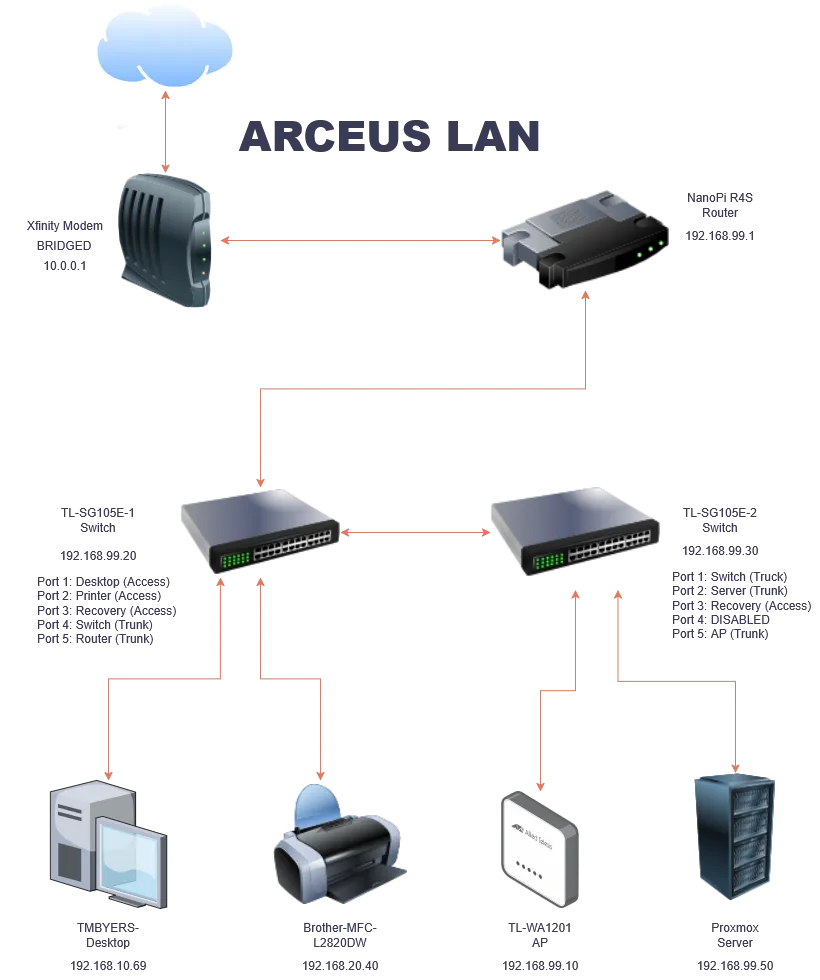
VLAN Design
The network was segmented into multiple VLANs based on trust level and function:
- VLAN 99 (Infrastructure): Router, switches, AP, Proxmox management
- VLAN 10 (Management): Trusted devices with access to infrastructure
- VLAN 20 (Family): General user devices
- VLAN 30 (IoT): Restricted internet-only devices
- VLAN 50 (VMs): Virtual machines and services
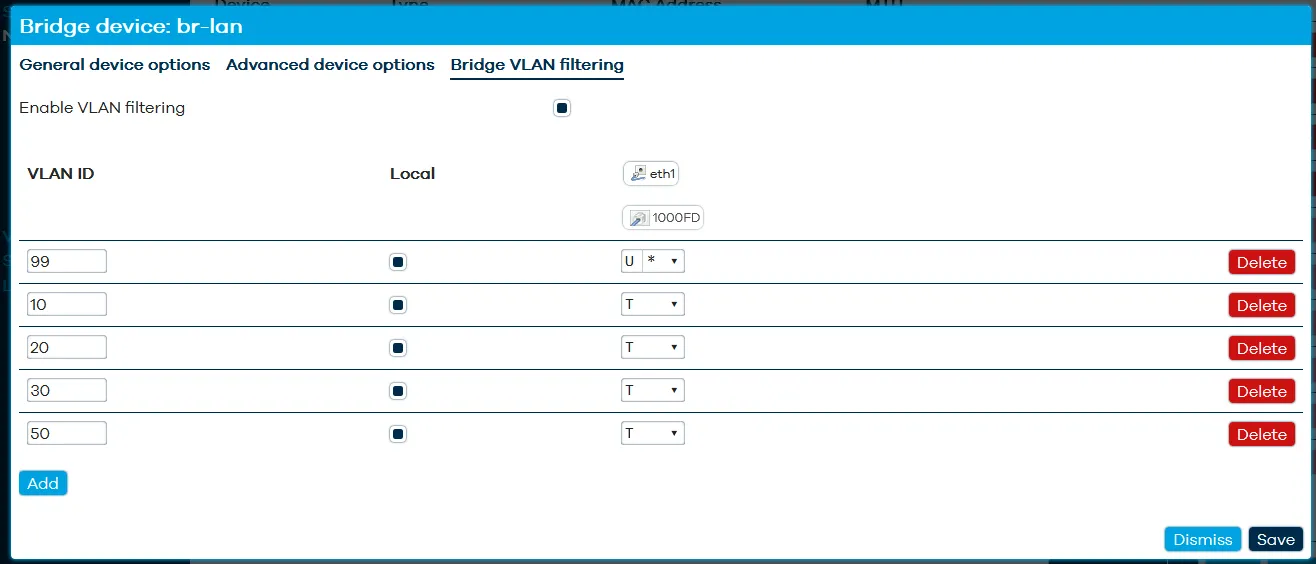
Switch Configuration
Managed switches were configured to support VLAN trunking and segmentation.
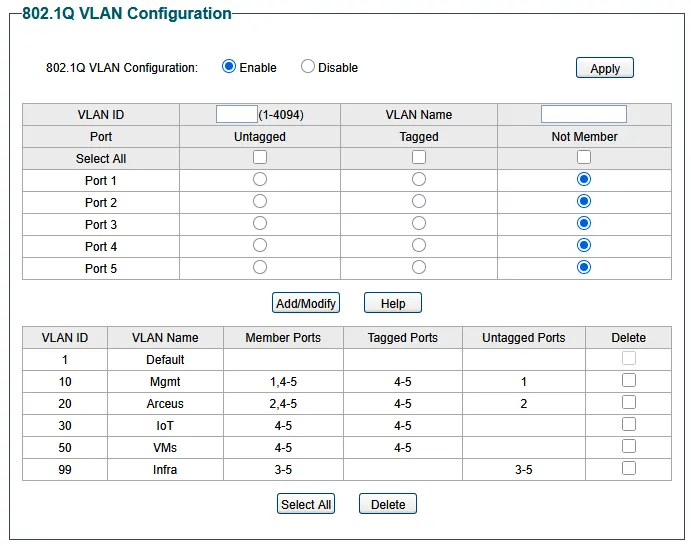
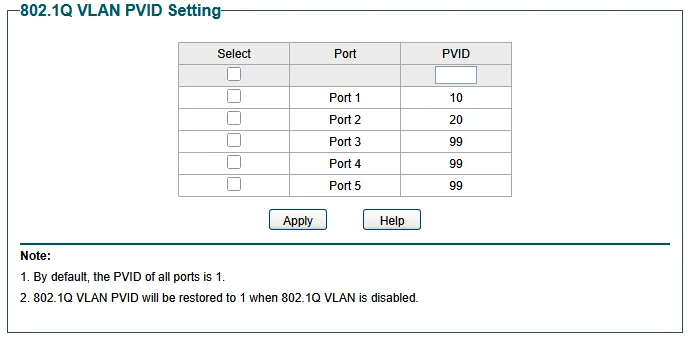
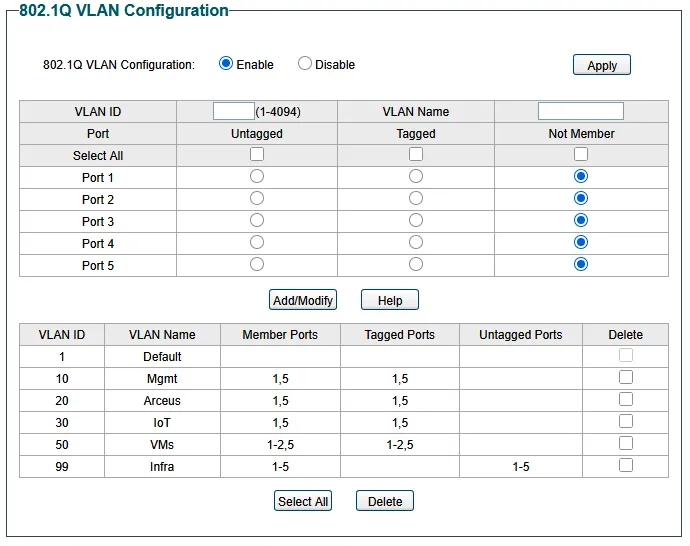
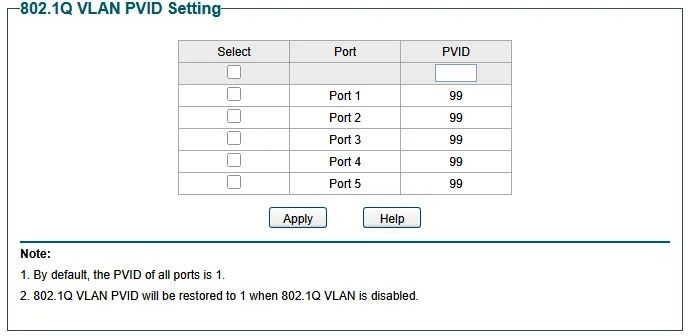
Key concepts implemented:
- Tagged trunk ports between switches and router
- Untagged access ports for endpoint devices
- PVID alignment for proper VLAN assignment
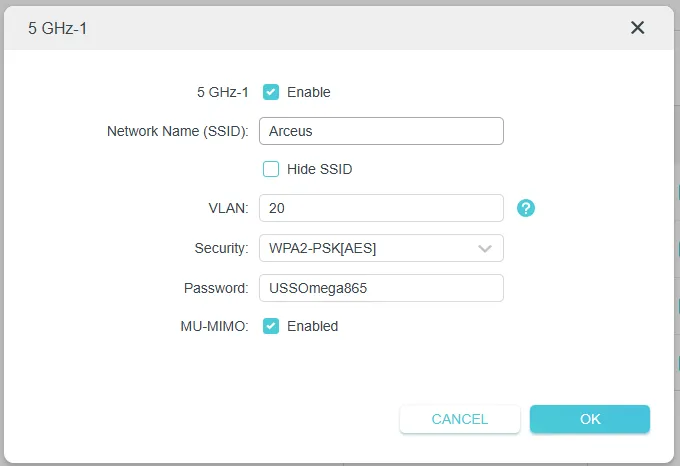
Wireless VLAN Segmentation
The access point was configured to broadcast multiple SSIDs mapped to VLANs.
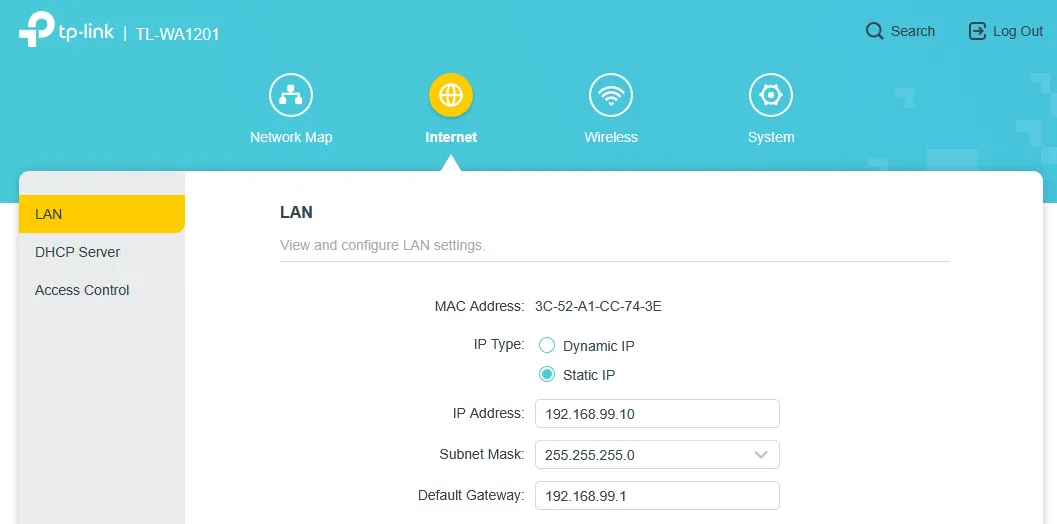
The AP was also assigned a static IP within the infrastructure VLAN.
Firewall Segmentation
Firewall rules enforce strict separation between VLANs.
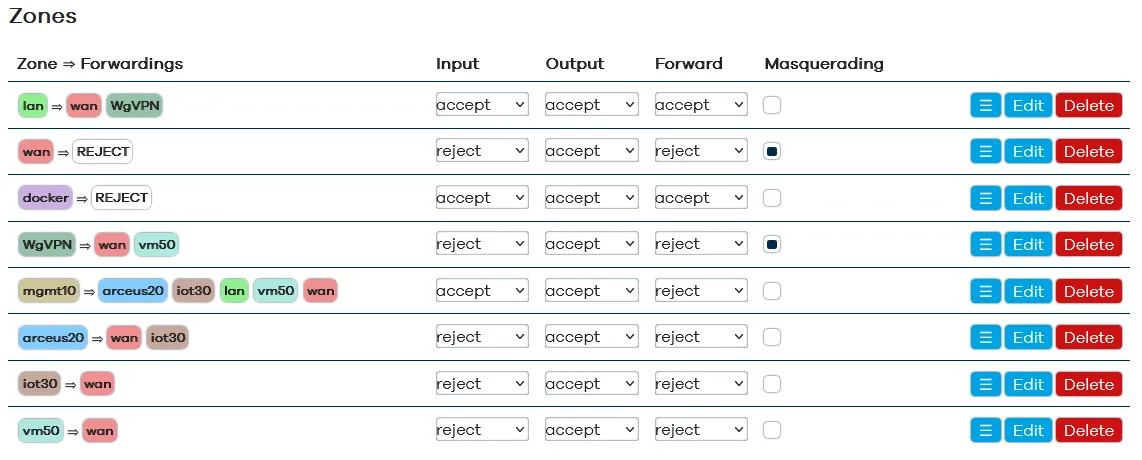
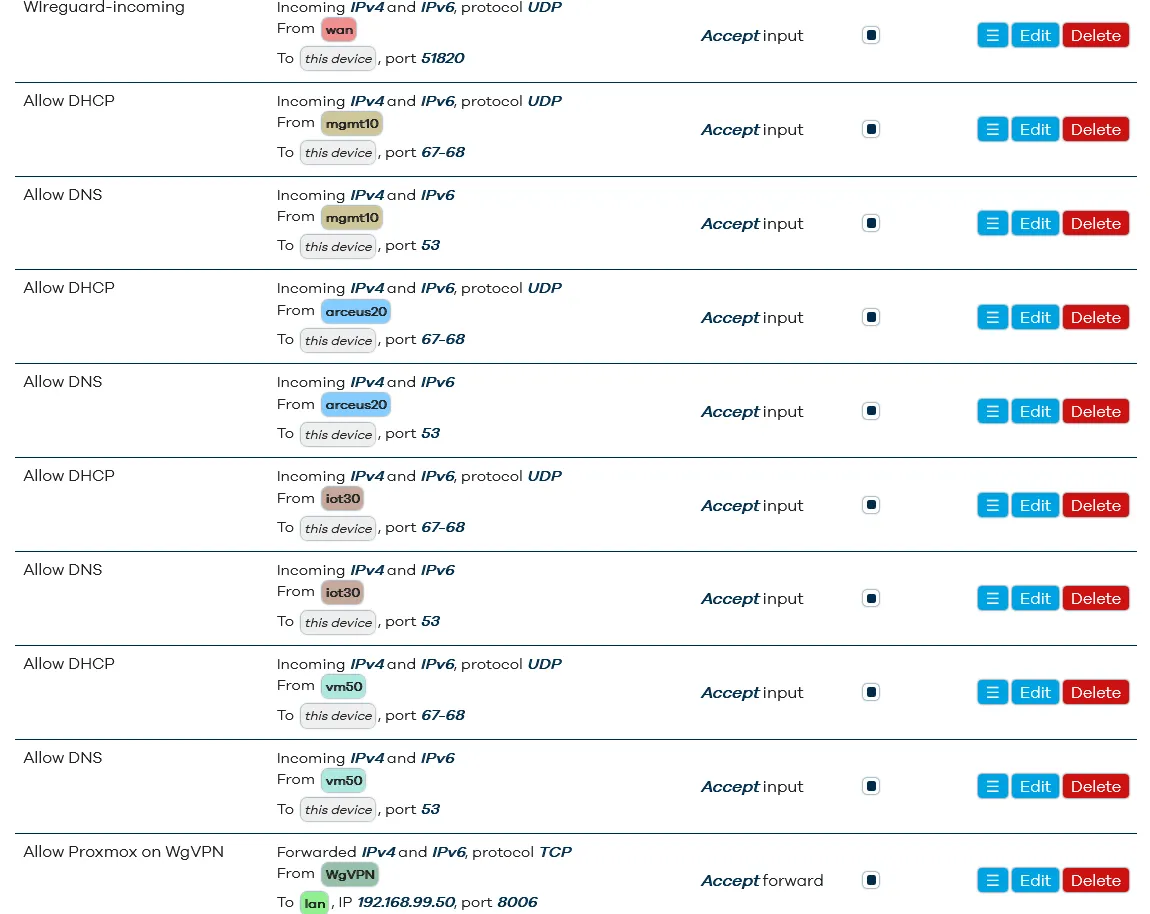
Key controls:
- Default deny between VLANs
- IoT VLAN restricted to internet only
- Management VLAN allowed access to infrastructure
- Granular allow rules for required services
Secure Remote Access (WireGuard VPN)
WireGuard was deployed to securely access internal resources remotely.
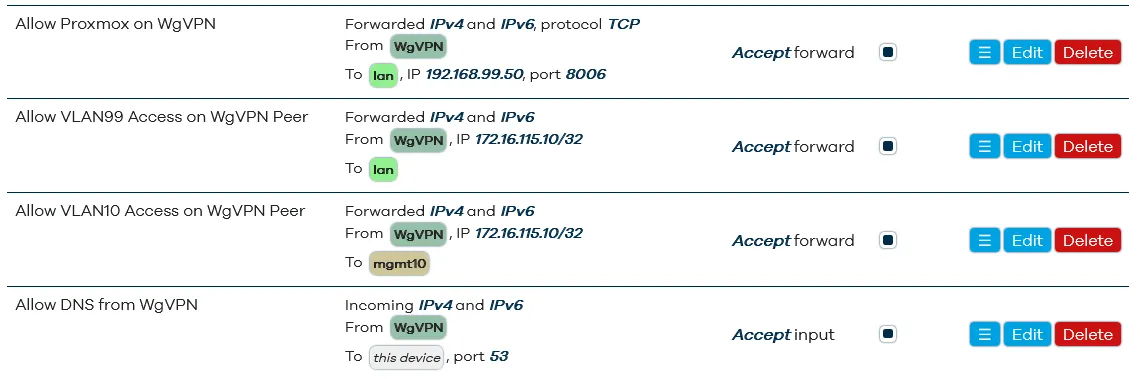
Features:
- Encrypted tunnel for remote devices
- Selective VLAN access per peer
- No direct exposure of internal services
Reverse Proxy & Domain Access
Internal services are accessed via a custom domain using Nginx Proxy Manager.
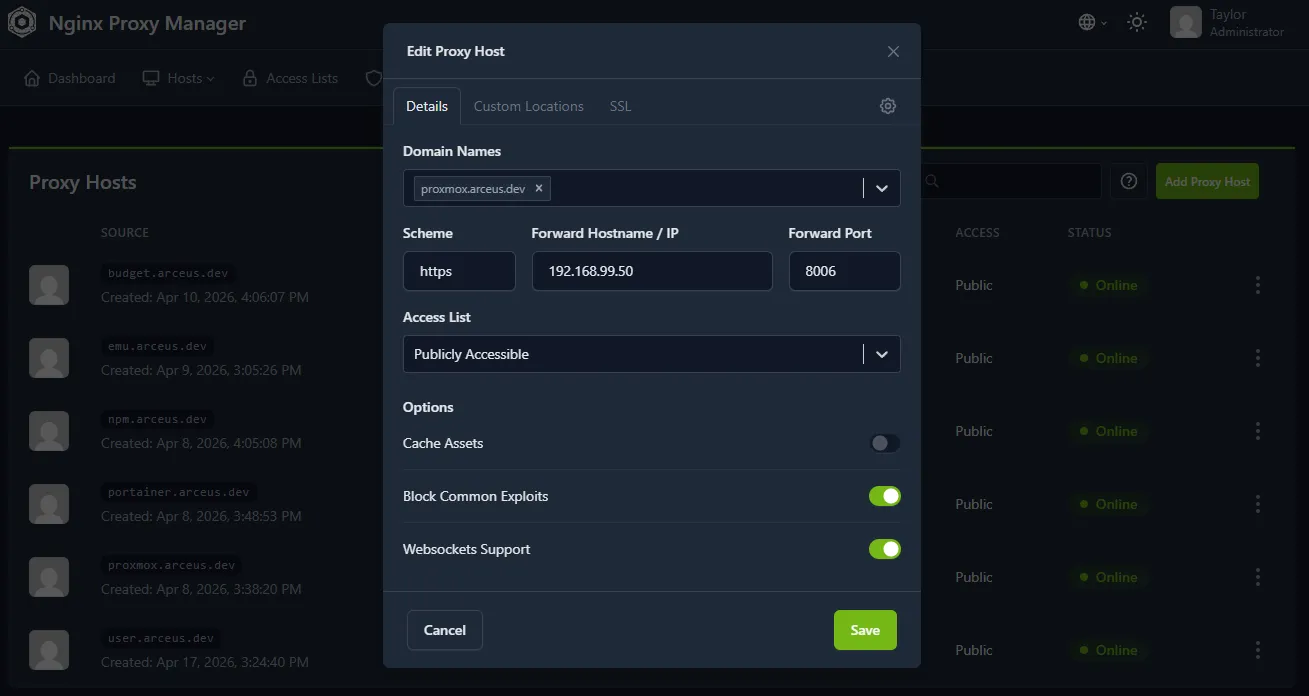
Capabilities:
- Domain-based routing (e.g., proxmox.arceus.dev)
- Automatic Let’s Encrypt certificates
- HTTPS access to internal services
- Centralized access management
Technical Deep Dive
The most critical part of the design was enforcing true segmentation, not just VLAN separation.
By combining:
- VLAN tagging
- Firewall zone isolation
- Default deny policies
the network prevents lateral movement between device groups.
Additionally, using WireGuard as the only entry point ensures:
- No services are publicly exposed
- Remote access is authenticated and encrypted
The reverse proxy layer improves usability while maintaining security by:
- abstracting internal IPs
- enforcing HTTPS
- enabling centralized control
Key Takeaways
- Enterprise-style segmentation can be implemented in a homelab
- Proper VLAN design significantly improves network security
- VPN-first access is safer than exposing services
- Reverse proxies enable secure and user-friendly service access